
22 Nov, 2025
What is a Custom Point of Sale (POS) System? — Pros & Cons
A Custom Point of Sale (POS) system is a retail or hospitality transaction platform built specifically to match a business’s unique needs rather than relying on off-the-shelf, one-size-fits-all software. Unlike generic POS packages, a custom POS is tailored in features, workflows, integrations, hardware choices, and user interfaces so it mirrors how your business actually operates — from specialty order flows and loyalty programs to industry-specific inventory rules and multi-location reporting. Below I’ll explain what a custom POS typically includes, why businesses choose one, and the tradeoffs to weigh before investing.
Core components of a custom POS system
A custom POS solution usually includes:
-
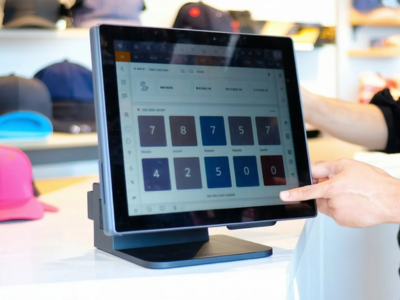
Sales interface: A checkout screen designed for your product mix (single-click product entry, modifiers for items, or advanced ticketing).
-
Inventory management: Tailored SKU logic (e.g., variants, serial/Lot tracking, BOMs for composed products).
-
Customer management: Custom CRM fields, loyalty rules, and segmentation.
-
Payments and hardware: Integration with chosen payment gateways, card readers, barcode scanners, kitchen printers, cash drawers, and tablets.
-
Reporting & analytics: Built to show the KPIs you care about (gross margin per category, per-server performance, shrinkage reports).
-
Integrations: Accounting (e.g., QuickBooks), e-commerce stores, supplier/order portals, and third-party apps.
-
Security & access control: Custom roles, permissions, and audit trails to match your operational policy.
-
Mobile & offline support: Native apps for Android/iOS and offline sale persistence if connectivity is lost.
-
Admin & deployment tooling: Central config, remote updates, and support channels.
Pros of a Custom POS System
1. Perfect fit for your workflows
The biggest benefit is alignment: checkout flows, discounts, tax rules, and reporting can be designed to minimize workarounds. That reduces human error and training time and increases cashier speed and satisfaction.
2. Competitive differentiation
Custom features — unique promotions, loyalty mechanics, or specialized kitchen routing — can become selling points that competitors with standard POS systems can’t replicate easily.
3. Better integration
When your POS is built for your exact software ecosystem (ERP, CRM, online store), data flows smoothly. That reduces duplicate work, manual reconciliation, and integration costs from using middleware or fragile connectors.
4. Scalability & extensibility
A well-designed custom solution can scale with your business: add new outlets, new product lines, or complex pricing rules without being blocked by a commercial vendor’s feature roadmap.
5. Ownership & control
You control feature priorities, update cadence, and data governance. You won’t be subject to a third party’s pricing changes, deprecated features, or forced upgrades.
6. Security & compliance tailored
You can implement security controls that match your compliance needs (local data residency, PCI scope minimization strategies, or custom encryption rules).
Cons of a Custom POS System
1. Higher upfront cost
Custom development requires design, coding, testing, and deployment. Initial investment is usually significantly higher than subscribing to a cloud POS, which is a barrier for small operations.
2. Longer time to deploy
Designing, building, and testing custom flows and integrations takes time. If you need to go live quickly (e.g., opening a new store next month), off-the-shelf options may be faster.
3. Ongoing maintenance responsibility
You’re responsible for bug fixes, security updates, payment compliance (PCI), and keeping integrations working when partners change APIs. That requires technical staff or a reliable vendor partnership.
4. Vendor lock-in risk (if outsourced poorly)
If you hire an external developer and don’t secure source code or proper documentation, you may become dependent on that vendor for future changes. Ensure contracts cover IP, handover, and support SLAs.
5. Potential for feature gaps
Commercial POS vendors have broad feature sets developed from many customers’ feedback. A custom system might initially lack less-critical but still useful features (e.g., advanced third-party integrations, marketplaces) that require additional development.
6. Resource requirements
You need a clear product roadmap, product owner, and QA processes. Without these, the custom project can drift, cost overruns may occur, and deliverables may not match expectations.
When should you choose a custom POS?
-
Your business has complex workflows (multi-step prep, serial-tracked inventory, split pricing, or subscription sales) that off-the-shelf POS cannot handle without extensive compromise.
-
You operate in a highly regulated or localized market requiring specific tax treatments, reporting, or data residency.
-
You need deep integration into proprietary systems — for example, a unique ERP, supplier portal, or a bespoke e-commerce engine.
-
You view the POS as a strategic asset that differentiates customer experience or operations.
-
You have the budget and commitment to maintain and evolve software over time.
How to reduce the downsides
-
Start with a Minimum Viable Product (MVP): Launch core features first (checkout, payments, inventory core) and iterate.
-
Choose modular architecture: Keep integrations and features decoupled so you can swap components later.
-
Retain IP and documentation: Ensure contracts give you source code, deployment scripts, and clear documentation.
-
Plan for PCI and security: Offload as much card data scope as possible to tokenized gateways to reduce compliance burden.
-
Have a clear support plan: Either build an in-house team or sign an SLA with a vendor for fast issue resolution.
Return on Investment (ROI) considerations
ROI depends on how well the custom POS reduces labor, prevents losses, speeds checkout, and supports revenue growth. Measure before/after KPIs such as:
-
Average transaction time
-
Employee onboarding time
-
Inventory variance/shrinkage
-
Upsell / loyalty revenue
-
Reporting time saved for managers
Even high initial costs can be justified if the system reduces manual reconciliation, prevents stockouts, improves customer retention, or enables new revenue streams.
Conclusion
A custom POS system can transform operations for businesses that need specialized workflows, deep integrations, or uniqueness in customer experience. The tradeoffs are higher upfront cost, responsibility for maintenance, and the need for disciplined product management. If your operation benefits from tailored logic enough to offset development and ongoing support costs, custom is often the smarter long-term choice.
If you want a partner that understands POS requirements and can tailor a solution to your needs, check out POSLinkSoft.com—they focus on POS solutions that can be custom-configured for businesses of different sizes.
If you’d like, I can: Draft a 1-page spec for a custom POS built around your business model, Or create a comparison table showing how a custom POS stacks up cost-wise vs three popular off-the-shelf platforms. Which would help you next?
Leave a Comment Here
Your email address will not be published*
Recent Posts


0 Comment